Vercel is the default answer for "where do I deploy my Next.js app". For a lot of projects that's the right answer. But if your users are in India, your app has a real backend, and you pay out of an Indian bank account, a few things change. This post goes through where each platform fits, where Vercel is clearly better, and where Riven makes more sense.
I build Riven, so read this with that in mind. I've tried to keep the Vercel parts accurate and link to their own pricing and docs so you can check.
The short answer
- Next.js or static frontend, global audience, team of developers: Vercel.
- API, server, worker or database, users mostly in India: Riven.
- Both: frontend on Vercel, API and database on Riven in Mumbai. This is a common setup and it works well.
What each platform is built for
Vercel is a frontend cloud. Your code runs on a global CDN and as functions that start per request. It's built by the team behind Next.js, so features like ISR, image optimisation and preview deployments work with almost no setup.
Riven is a PaaS for full apps. You connect a GitHub repo, Riven detects the framework (Next.js, Vite, Express, Fastify, Django, Flask, FastAPI and more) and runs it as a normal long-running server in a container. Databases sit next to your app in the same region.
The difference matters most for backends. A function is great for short requests. A server is better for anything that holds state, keeps connections open, or runs for a while.
Pricing: rupees vs dollars
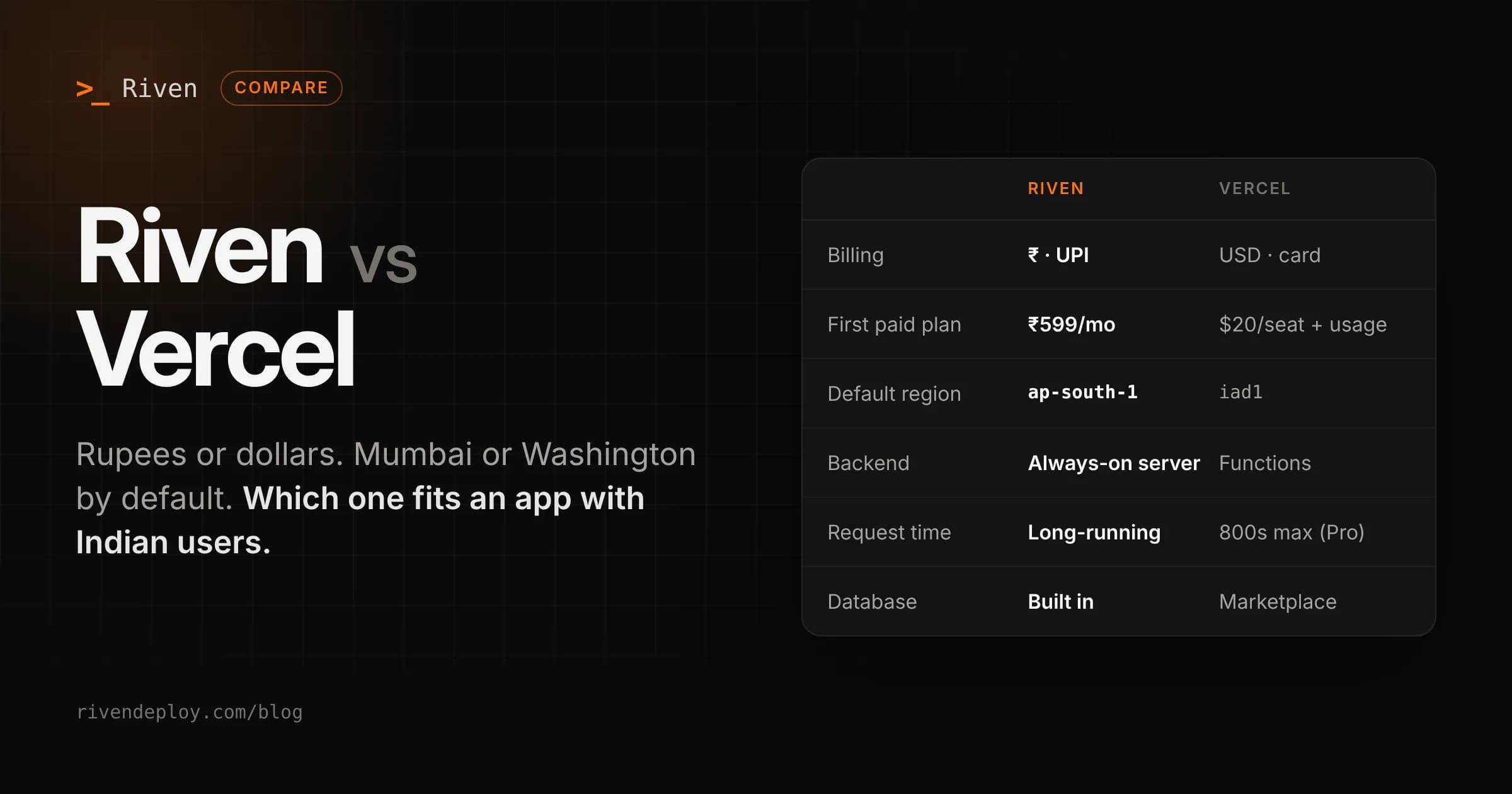
| Riven | Vercel | |
|---|---|---|
| Free plan | Yes, 1 web service (sleeps when idle) + 1 static site | Hobby, personal and non-commercial use only |
| First paid plan | ₹599/month (Udaan, 1 always-on service) | Pro, $20 per developer seat/month plus usage |
| How you pay | INR via UPI, cards, netbanking | USD, card |
| Tax | No GST added on top | Prices exclude GST, added on invoice where required |
| Billing model | Flat monthly plan per service, small per-GB rate over bandwidth | Seat price + usage meters (CPU, memory, invocations, data transfer and more) |
| Database | Separate plans from ₹399/month | Through Marketplace partners, billed separately |
Two things to note about Vercel. The Hobby plan can't be used for commercial projects, so the moment your app makes money you're on Pro. And Pro is priced per developer seat, so a team of three starts at $60/month before usage.
On Riven, plans are per service, not per person. Invite your whole team to a workspace and the bill doesn't change. Static sites are free or ₹299/month, web services are ₹599, ₹1,499 or ₹3,499 a month, and databases are ₹399 or ₹799 a month. You can see every limit on the pricing page.
Paying in USD from India also has a cost that doesn't show on the pricing page: your bank's forex markup on every charge, and international card payments that sometimes fail because of mandate rules.
Where your code actually runs
Vercel has a huge CDN with points of presence across the world, including India. Static files and cached pages are served from close to your users, which is great.
But Vercel Functions run in iad1 (Washington, D.C.) by default. Vercel does have a Mumbai region (bom1) and you can switch to it, but if you don't, every uncached request from an Indian user crosses to the US and back. If your database is also in the US, that's fine. If your database is in Mumbai, every query from a US function adds a round trip across the ocean.
Riven runs everything in Mumbai (AWS ap-south-1). Your app and your database are in the same region by default, and your data stays in India. I wrote more about why this matters in A CDN does not make your app fast in India.
Backends, long requests and background work
This is where the two platforms differ the most.
On Vercel, backend code runs as functions. With Fluid compute, a function can run up to 300 seconds on Hobby and 800 seconds on Pro (there's a 30 minute beta on Pro). Request and response bodies are capped at 4.5 MB. WebSockets are supported but still in public beta. For most API routes this is plenty. For file processing, long-running jobs, queues or real-time features, you start working around the limits.
On Riven, your backend is a normal server process. It stays on (on paid plans), keeps its connections open, and you can run background workers on every plan. An Express or FastAPI app runs the same way it runs on your laptop, with no adapter and no function config.
The trade-off: a server costs money even when it's idle, while functions scale to zero. That's why Riven's free plan sleeps when idle and paid plans are always on.
Databases
Vercel doesn't run its own database. You add one through the Vercel Marketplace (Neon, Supabase, Upstash and others), and it's billed on top of your Vercel plan. These are good products, but you're now managing two vendors and two bills, and the database may not be in the same region as your functions.
Riven has managed databases built in: PostgreSQL, MySQL, MongoDB and Valkey (Redis-compatible), all in Mumbai. Backups run automatically every day and you can restore from the dashboard. On the Dhara plan you can turn on outside access and limit it to IP addresses you choose.
Where Vercel is better
I'd rather you pick the right tool than pick Riven for the wrong reason. Vercel is the better choice when:
- You need a global audience to get fast pages. Vercel's CDN covers far more locations. Riven runs in one region, Mumbai.
- You want a preview deployment for every branch and pull request. This is one of Vercel's best features. Riven uses one set of environment variables per service and doesn't create per-branch previews.
- You rely on Next.js platform features like ISR, on-demand revalidation, image optimisation at the edge or middleware at the edge. They work best on Vercel.
- You need compliance paperwork like SOC 2 or ISO 27001 for an enterprise customer.
- Your traffic is very spiky. Functions scale to thousands of concurrent requests without you thinking about instances.
Where Riven is better
- Your users are in India and you want your server and database next to each other in Mumbai.
- You're paying out of an Indian account and want rupee pricing over UPI with nothing added at checkout.
- Your backend is a real server: Express, Fastify, Django, FastAPI, workers, cron-style jobs, WebSockets, long uploads.
- You want one flat bill that doesn't depend on how many developers are on the team.
- You want your app and database in one place, with one dashboard and one invoice.
- You deploy from your editor or an AI assistant. Riven has a CLI and an MCP server, so you can deploy and check services from tools like Claude.
Using both together
You don't have to choose one for the whole stack. A setup that works well for Indian products:
- Next.js frontend on Vercel, so pages and assets are served from the CDN.
- API on Riven in Mumbai, as an always-on service.
- Database on Riven, in the same region as the API. The frontend calls the API over HTTPS. Your API and database talk inside the same region, so queries stay fast, and the only cross-region hop is the one Vercel already optimises.
Moving an API from Vercel to Riven
If you already have an Express or Node API running as Vercel functions:
- Make sure your app starts a server with
app.listen(process.env.PORT)instead of exporting a handler. - Sign in to Riven with GitHub and pick the repo. Riven detects the framework and build command.
- Copy your environment variables over from Vercel.
- Create a database on Riven if you need one, and point
DATABASE_URLat it. - Add your custom domain. SSL is set up for you. Your frontend keeps running on Vercel. Only the API base URL changes.