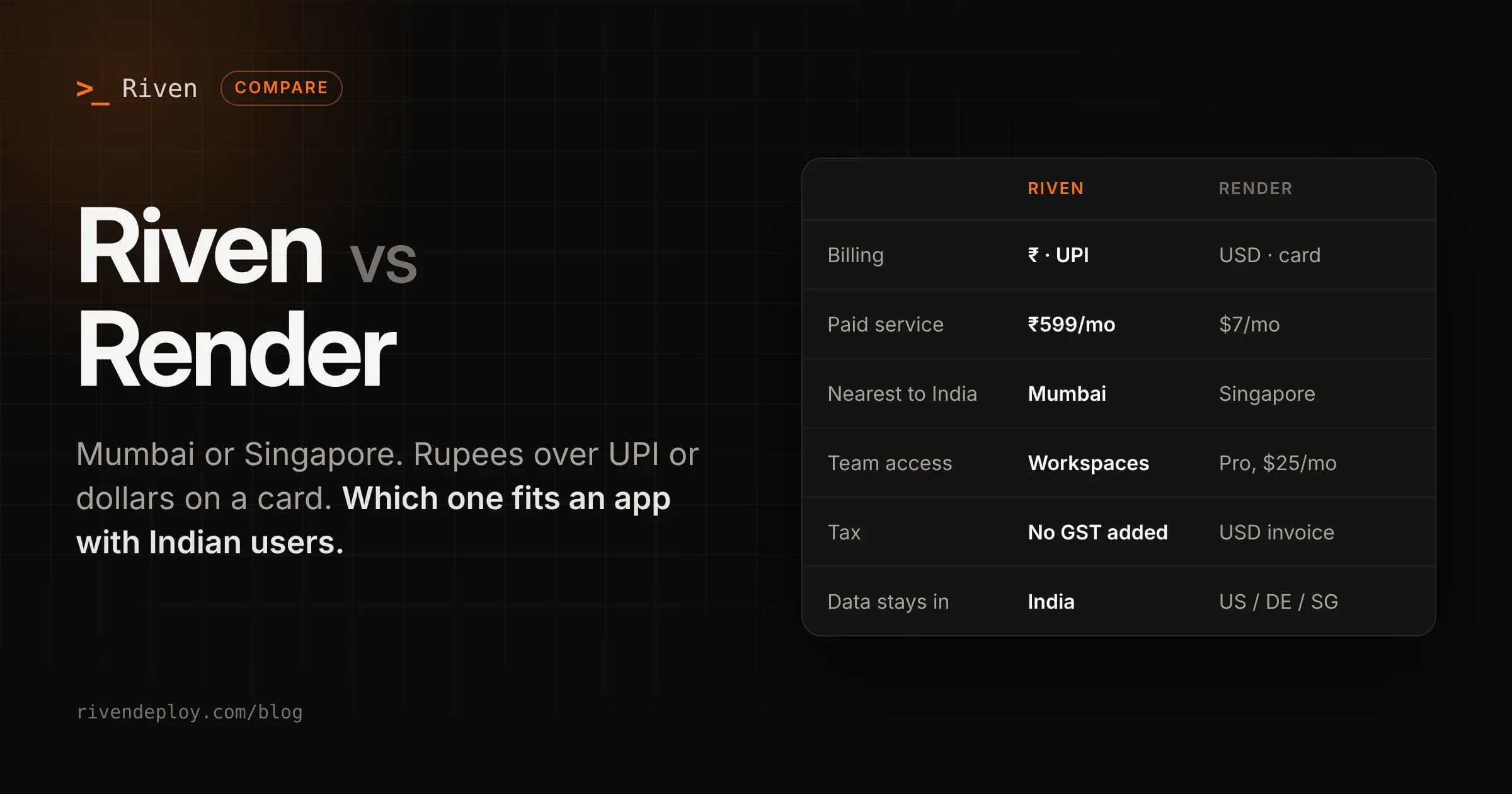
Render is one of the platforms people move to after Heroku, and for good reason. It's simple, priced per instance, and runs real servers, not functions. Riven works the same way. So the comparison comes down to region, currency, and how much room you need to grow.
I build Riven, so keep that in mind. The Render details here come from their pricing page and docs, linked at the end.
The short answer
- You need bigger machines, autoscaling, preview environments, or users in the US and Europe: Render.
- Your users are in India and you want to pay in rupees over UPI: Riven.
- You only want the most RAM per dollar for one small service: Render's $7 instance gives you more than Riven's ₹599 plan.
How pricing works
Both platforms charge a fixed monthly price for each service. That's the part they share. How the rest of the bill is built is different.
Render has two layers. First a workspace plan: Hobby is free for one person, and Pro is $25 a month with unlimited seats and team features. Then each service is billed by instance size. The smallest paid web service is $7 a month for 512 MB of RAM and a fraction of a CPU, going up to large machines with many CPUs and tens of GB of RAM. Outbound bandwidth above your workspace's included amount is $0.15 per GB.
Riven has one layer. You pay per service, in rupees. Web services are free (sleeps when idle), ₹599, ₹1,499 or ₹3,499 a month. Static sites are free or ₹299. Databases are ₹399 or ₹799. Bandwidth above your plan's included amount is ₹7–8 per GB. Every limit is on the pricing page.
| Riven | Render | |
|---|---|---|
| Free web service | Yes, sleeps when idle | Yes, spins down after 15 min idle |
| Smallest paid web service | ₹599/month, 256 MB RAM | $7/month, 512 MB RAM |
| Team features | Workspaces with roles and invites | Pro workspace, $25/month |
| Bandwidth overage | ₹7–8 per GB | $0.15 per GB |
| Currency | INR via UPI, cards, netbanking | USD, card |
| Tax | No GST added on top | Billed in USD |
Let's be straight about the entry plan. Render's $7 instance has twice the RAM of Riven's ₹599 Udaan plan. If raw resources per rupee is the only thing you're comparing, Render wins at that size. What you get on Riven for the money is Mumbai, rupee billing over UPI, and no forex markup or international card failures on every renewal.
If you're a team on Render, add the $25 Pro workspace to your monthly cost. On Riven, team access doesn't change the bill.
Where your app runs
Render has five regions: Oregon, Ohio and Virginia in the US, Frankfurt in Germany, and Singapore. There's no region in India. Singapore is the closest, so requests from Indian users go there and back. Static sites on Render are served from a global CDN, so this mostly affects your backend and database.
Riven runs everything in Mumbai (AWS ap-south-1). Your app and database sit in the same region, and your data stays in India. More on why that matters in A CDN does not make your app fast in India.
Free tiers
Both platforms have a free web service that sleeps when nobody is using it.
On Render, a free service spins down after 15 minutes without traffic and takes about a minute to come back. You get 750 free instance hours per workspace each month. Files written to disk are lost on restart, and Render says not to use free services for production.
Render's free Postgres is a trap if you don't read the fine print. It's limited to 1 GB, has no backups, and expires 30 days after you create it. After a 14 day grace period, the database and its data are deleted unless you upgrade.
On Riven, the free Ankur plan sleeps when idle and wakes on the next request. Riven doesn't have a free database, but databases you pay for don't expire and are backed up every day.
Managed Postgres and Redis
Render's paid Postgres starts at $6 a month for a small instance with 1 GB of storage, with extra storage at $0.30 per GB, and scales up to very large machines. Key Value (Redis-compatible) starts at $10 a month for 256 MB.
Riven's database plans start at ₹399 a month. Every plan supports PostgreSQL, MySQL, MongoDB and Valkey (Redis-compatible), so you pick the engine when you create it. Backups run automatically every day and you restore from the dashboard. On the Dhara plan you can turn on outside access limited to IP addresses you choose. Everything runs in Mumbai, next to your app.
Where Render is better
- More resources at the low end. The $7 instance has 512 MB of RAM. Riven's paid service plans start at 256 MB.
- Room to grow. Render goes up to 12 CPU and 96 GB machines, with horizontal autoscaling on Pro. Riven is built for small and medium apps.
- Preview environments. Render can spin up previews for pull requests, including full-stack previews on Pro. Riven uses one set of environment variables per service and doesn't create per-branch previews.
- Regions outside India. If your users are in the US or Europe, Render has a region close to them.
- Track record. Render has been running production apps for years and has compliance and enterprise options.
Where Riven is better
- Your users are in India. Mumbai is closer than Singapore, and data stays in India.
- You pay in rupees. UPI, Indian cards and netbanking, with no GST added at checkout.
- Databases don't expire. No 30 day limit, and daily backups on every plan.
- One bill without a workspace fee. You pay for services, not for team access.
- You deploy from your editor or an AI assistant. Riven has a CLI and an MCP server, so you can deploy and check services from tools like Claude.
Moving from Render to Riven
Both platforms run your app as a normal server, so most apps move without code changes.
- Sign in to Riven with GitHub and pick the repo. Riven detects the framework and build command. If you have a Dockerfile, it's used.
- Copy your environment variables from Render.
- If you use Render Postgres, create a database on Riven, take a
pg_dumpfrom Render and restore it withpg_restore. UpdateDATABASE_URL. - Make sure your app listens on the
PORTenvironment variable. - Add your custom domain and switch DNS once the new service is healthy. Keep the Render database running until you've checked the data on the new one.