Most of our comparisons come down to one thing: the other platform doesn't have a region in India. DigitalOcean is different. It has a Bangalore datacenter, and App Platform can deploy there. So if "is it hosted in India" is your only question, DigitalOcean and Riven both say yes.
That makes this comparison more about price, billing and what you get, not geography.
I build Riven, so keep that in mind. The DigitalOcean details come from their pricing pages and docs, linked at the end.
The short answer
- You want a full cloud (VMs, Kubernetes, object storage, load balancers) with App Platform as one piece of it: DigitalOcean.
- You want the most RAM per dollar for a small container: DigitalOcean's $5 instance.
- You want to pay in rupees over UPI with no GST added, a free web service, and cheaper managed databases: Riven.
Where your app runs
DigitalOcean App Platform runs in several regions including New York, San Francisco, Toronto, London, Amsterdam, Frankfurt, Singapore and Bangalore. New York is the default, so pick Bangalore when you create the app if your users are in India.
Riven runs everything in Mumbai (AWS ap-south-1). There's no region to pick, and your app and database are always in the same place.
For Indian users, both are close. Bangalore and Mumbai are both in India, and the latency difference for most users is small. If you're coming from a platform without an Indian region, either one is a big improvement. More on why region matters in A CDN does not make your app fast in India.
Pricing and what you actually pay
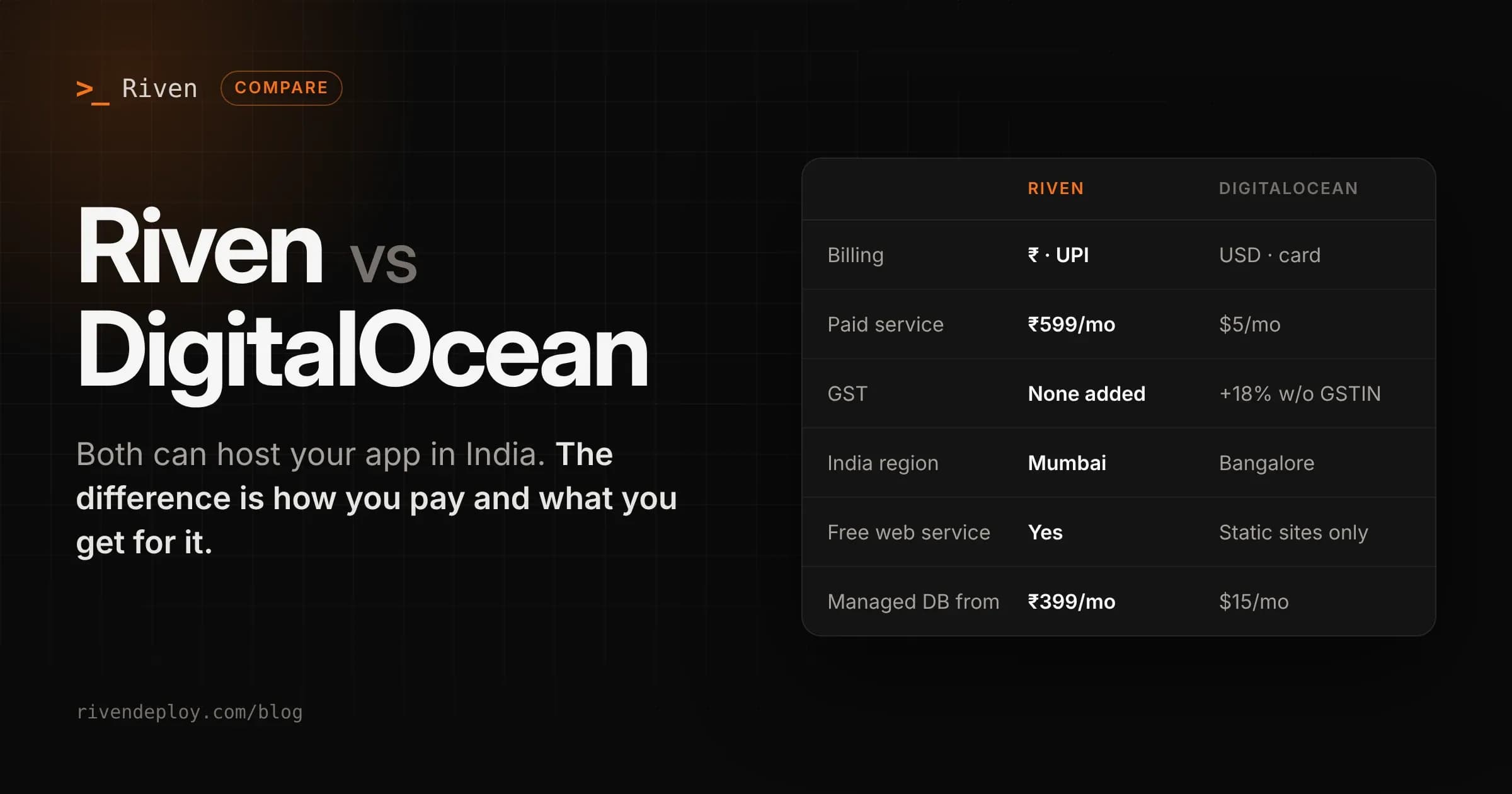
| Riven | DigitalOcean App Platform | |
|---|---|---|
| Free | 1 web service (sleeps when idle) + 1 static site | 3 static sites, no web services |
| Smallest paid web service | ₹599/month, 256 MB RAM | $5/month, 512 MB RAM, 1 shared vCPU |
| Next size | ₹1,499/month, 2 services | $10–12/month, 1 GB RAM |
| Bandwidth over the limit | ₹7–8 per GB | $0.02 per GB |
| Managed database | From ₹399/month | Dev database $7/month (Postgres only), managed from about $15/month |
| Currency | INR via UPI, cards, netbanking | USD only |
| GST | Not added | 18% added unless you add a GSTIN |
Let's be clear about the compute side. DigitalOcean's $5 instance has twice the RAM of Riven's ₹599 plan, a full shared vCPU, and 50 GB of included bandwidth. Bandwidth overage at $0.02 per GB is also much cheaper than most platforms, Riven included. On resources per dollar, DigitalOcean wins.
The GST line
DigitalOcean bills only in USD. If your account doesn't have a GSTIN, DigitalOcean adds 18% GST to every invoice, so a $5 container is really $5.90. If you do have a GSTIN, it isn't added to the invoice, but you pay it yourself under reverse charge.
Riven isn't GST registered yet, so nothing is added. ₹599 is ₹599. For students, freelancers and small teams without a GSTIN, that's a real difference, on top of the forex markup your bank adds to every USD charge.
Free tiers
DigitalOcean's free tier covers static sites only. Any app with a backend, even a small Express API, starts at $5 a month.
Riven's free Ankur plan includes one web service that sleeps when idle and wakes on the next request. It's enough for a side project, a demo or a college project with a real backend.
Databases
DigitalOcean offers a $7 dev database (512 MB, PostgreSQL only) attached to an app, and full managed databases starting around $15 a month for 1 GB of RAM, with PostgreSQL, MySQL, MongoDB and Valkey. Their managed databases are powerful and scale well past what Riven offers.
Riven's databases start at ₹399 a month. Every plan supports PostgreSQL, MySQL, MongoDB and Valkey (Redis-compatible), backups run automatically every day, and you restore from the dashboard. On the Dhara plan you can turn on outside access limited to IP addresses you choose.
If your database is small, Riven costs less. If you need a bigger database with replicas, DigitalOcean is the better fit.
Where DigitalOcean is better
- More compute per dollar. 512 MB and a full shared vCPU for $5, and cheap bandwidth.
- A whole cloud. Droplets, Kubernetes, Spaces object storage, load balancers, VPC networking. You can grow out of App Platform without leaving DigitalOcean.
- More regions. If you later need users in the US or Europe served from close by, it's a setting.
- Bigger databases. Managed databases with standby nodes and read replicas.
- Autoscaling on dedicated instances.
- Track record. DigitalOcean has been running developer infrastructure for over a decade and is a public company.
Where Riven is better
- Rupee billing over UPI. Indian cards and netbanking too, no USD card needed.
- No GST added at checkout. The plan price is the final price.
- A free web service, not just static sites.
- Cheaper small databases, with four engines on every plan and daily backups.
- Simpler defaults. No region to choose, no instance size to tune. Connect a repo and it deploys.
- You deploy from your editor or an AI assistant. Riven has a CLI and an MCP server, so you can deploy and check services from tools like Claude.
Moving from DigitalOcean App Platform to Riven
App Platform and Riven both build from your Git repo and run your app as a container, so moving is straightforward.
- Sign in to Riven with GitHub and pick the repo. Riven detects the framework and build command. If your App Platform app uses a Dockerfile, Riven uses it too.
- Copy your environment variables from the App Platform settings.
- If you use a DigitalOcean database, create one on Riven, dump the data (
pg_dumpfor Postgres,mysqldumpfor MySQL) and restore it. UpdateDATABASE_URL. - Make sure your app listens on the
PORTenvironment variable. - Add your custom domain on Riven and switch DNS once the new deploy is healthy.