Netlify is where a lot of developers deploy their first site. Push a React or Astro project, get a URL, done. For static sites and frontends it's still one of the nicest experiences around.
Riven does something different. It runs your whole app, including the backend and database, as a long-running server in Mumbai. So this comparison is less "which is better" and more "which part of your stack goes where".
I build Riven, so keep that in mind. The Netlify details come from their pricing page and docs, linked at the end.
The short answer
- Static site, Jamstack frontend, marketing site, docs: Netlify.
- API, server, worker or database for users in India: Riven.
- Both: frontend on Netlify, backend and database on Riven. This works well and keeps each tool doing what it's good at.
What each platform is built for
Netlify serves your built frontend from a global CDN and runs backend code as functions that start per request. Functions are good for small jobs like form handling, webhooks or a few API routes.
Riven runs your app as a normal server in a container. It stays on (on paid plans), keeps connections open, and can run background workers. Databases sit in the same region as your app.
Pricing: credits vs flat plans
Netlify moved to a credit-based model. Every plan gets a monthly pool of credits, and different things use them up:
- a production deploy uses 15 credits
- 1 GB of bandwidth uses 20 credits
- 1 GB-hour of compute uses 10 credits
- 10,000 web requests use 2 credits The Free plan has 300 credits a month as a hard limit. Personal is $9 a month for 1,000 credits and one member. Pro is $20 a month with 3,000 or more credits and unlimited members.
The part to watch: when a site runs out of credits, Netlify pauses it until the next billing cycle, unless you've turned on auto recharge. And if one project goes over, all projects on the account are paused. That's a sensible guard against surprise bills, but it also means a traffic spike can take your site offline.
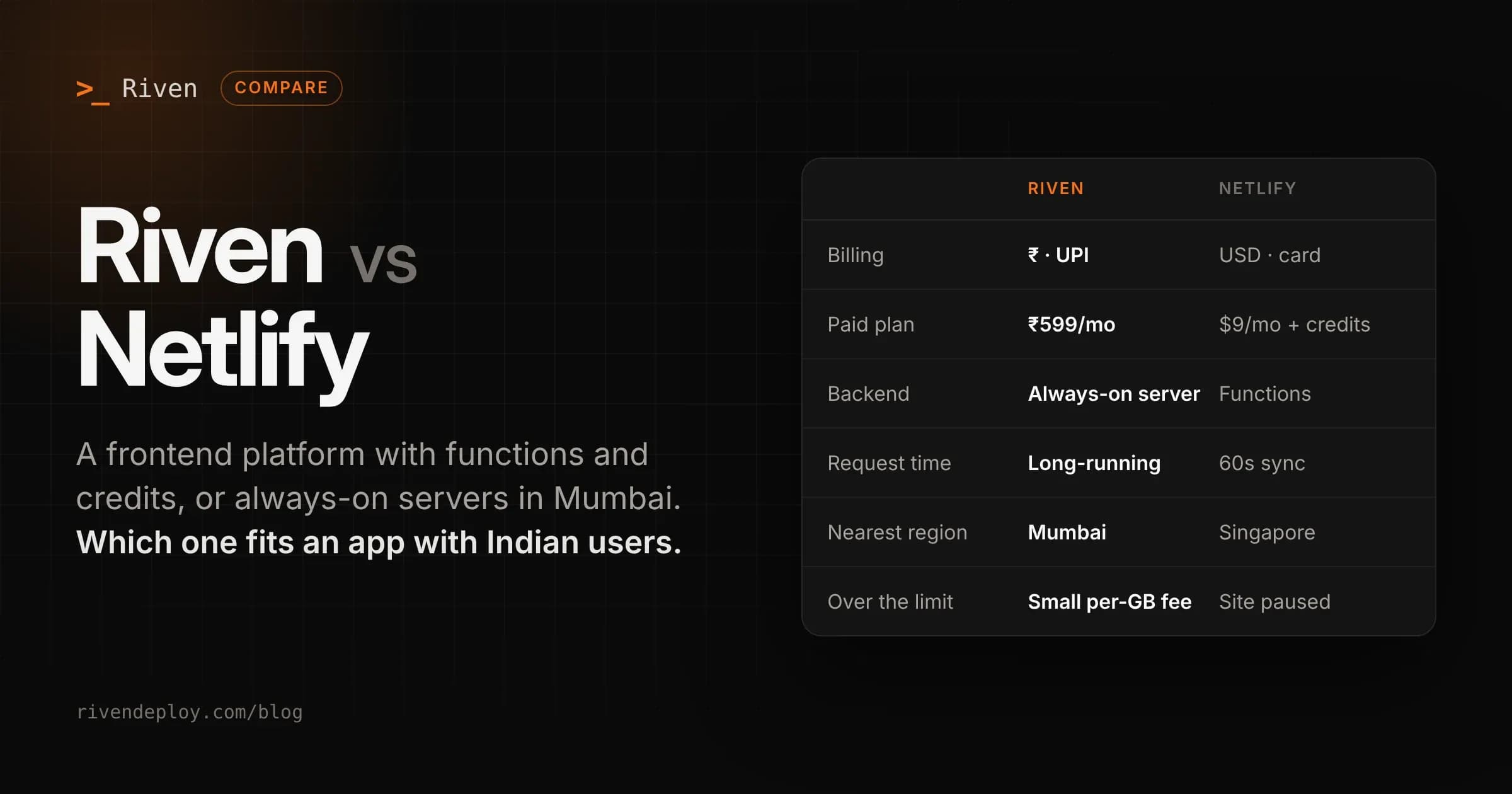
Riven charges a flat monthly price per service, in rupees. Web services are free (sleeps when idle), ₹599, ₹1,499 or ₹3,499 a month. Static sites are free or ₹299. Databases are ₹399 or ₹799. On paid plans, bandwidth over the included amount costs a few rupees per GB, and your site stays up. Every limit is on the pricing page.
| Riven | Netlify | |
|---|---|---|
| Free | 1 web service + 1 static site | 300 credits/month, hard limit |
| Entry paid plan | ₹599/month, 1 always-on service | Personal, $9/month, 1,000 credits |
| Team plan | Workspaces, billed per service | Pro, $20/month, unlimited members |
| Billing model | Flat price per service | Credits for deploys, bandwidth, compute, requests |
| Over the limit (paid) | Small per-GB fee, site stays up | Site paused unless auto recharge is on |
| Currency | INR via UPI, cards, netbanking | USD, credit card |
A practical note on credits: every production deploy costs 15 credits. On the Free plan, 20 deploys in a month use the whole 300-credit pool before a single visitor shows up. If you push often, plan for that.
Backends and long requests
Netlify Functions have hard limits:
- A normal (synchronous) function can run for 60 seconds, and that isn't configurable.
- Background functions can run for 15 minutes, but the caller only gets an empty 202 response, so the result has to go somewhere else.
- Request and response bodies are capped at 6 MB, which drops to about 4.5 MB for binary uploads. For form handlers and webhooks, that's plenty. For a real API, file processing, long reports or anything that holds a connection open, you'll hit the walls.
On Riven, your backend is a normal server process. An Express, Fastify, Django or FastAPI app runs the same way it runs locally, with background workers included on every service plan.
Where your code runs
Netlify's CDN serves your static files from around the world, including close to India.
Netlify Functions are different: they run in one region, and the default is US East (Ohio). Pro and Enterprise plans can change the region, and the closest self-serve option to India is Singapore. There's no Indian region in Netlify's list. So a function call from a user in India goes to Ohio by default, or Singapore if you've changed it.
Riven runs everything in Mumbai (AWS ap-south-1). Your API and database are in India, next to each other. More on why that matters in A CDN does not make your app fast in India.
Databases
Netlify doesn't run a general-purpose database for your app. You'd usually connect an outside provider and pay for it separately.
Riven has managed databases built in: PostgreSQL, MySQL, MongoDB and Valkey (Redis-compatible), all in Mumbai, with automatic daily backups and restore from the dashboard.
Where Netlify is better
- Static sites and frontends. Global CDN, instant rollbacks, deploy previews for every pull request, and a very smooth setup for React, Astro, Next.js and others.
- Deploy previews. Every PR gets its own URL. Riven deploys one branch per service and doesn't create per-PR previews.
- Built-in extras like form handling that save you writing a backend for simple sites.
- Global audience. If your users are spread across the world, Netlify's CDN covers far more locations. Riven runs in one region.
- Cost control by default. Hard limits mean you won't get a surprise bill on the Free plan.
Where Riven is better
- Real backends. No 60 second limit, no adapter, no function config. Your server just runs.
- Your users are in India. API and database in Mumbai, not Ohio or Singapore.
- Your site doesn't pause when traffic spikes on a paid plan.
- Databases included, in the same region as your app.
- Rupee billing over UPI, with no GST added at checkout and no international card needed.
- You deploy from your editor or an AI assistant. Riven has a CLI and an MCP server, so you can deploy and check services from tools like Claude.
Using both together
A setup that works well for Indian products:
- Frontend on Netlify, served from the CDN with deploy previews for every PR.
- API on Riven in Mumbai, as an always-on service.
- Database on Riven, next to the API. The frontend calls the API over HTTPS. Netlify does what it's best at, and your backend gets a real server close to your users.
Moving Netlify Functions to Riven
If your Netlify Functions have grown into an API:
- Move the function handlers into a small Express or Fastify app, one route per function.
- Start the server with
app.listen(process.env.PORT). - Push it to GitHub, sign in to Riven and pick the repo. Riven detects the framework.
- Copy your environment variables over.
- Point your frontend's API URL at the new Riven service. Your frontend stays on Netlify. Only the API moves.