Every hosting platform asks you the same four questions. Build command. Start command. Output directory. Root directory. You have answered them on Vercel, on Render, on Railway, and you will answer them again on the next one.
They are not hard questions. They are just boring, and they are the same answers almost every time. npm run build. dist. node dist/index.js. If the answer is nearly always the same, the form should not exist.
So Riven tries to answer them for you. This post is about how that works, and — more usefully — about the places where it does not.
The rule everything else follows
Before any of the mechanics, one rule governs the whole system:
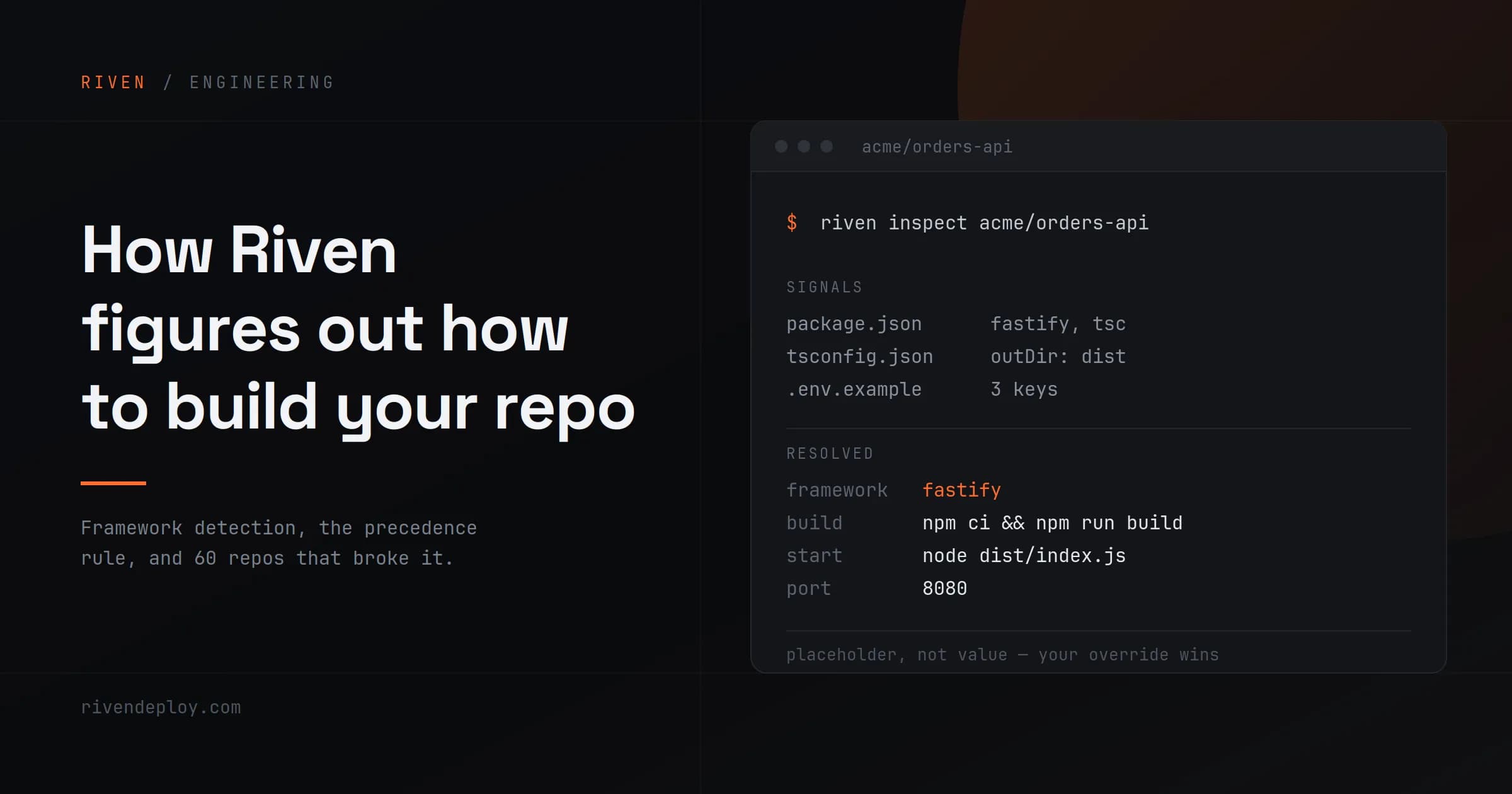
Your explicit override beats the detector. The detector beats the framework default.
That ordering sounds obvious. It is easy to break. Early on, the detector would run, produce a start command, and silently overwrite the one the user had typed into the form. From the user's side, they filled in a field and the platform ignored it. That is worse than not detecting at all, because now the platform is lying to you about what it is going to run.
The fix is small and worth stating precisely: a detected value is a placeholder, never a value. If we prefill the input box with real text, that text becomes an explicit override the moment the form is submitted, and the precedence rule is dead. Greyed-out placeholder text means "this is what we will use if you leave it alone." That distinction is the entire feature.
What actually happens when you paste a repo URL
The path from a GitHub URL to a running container is four steps.
1. A shallow clone. Not an API call — an actual git clone --depth 1 --single-branch. This matters more than it sounds like it should. An earlier version of the pipeline used a metadata call to read the repo instead of cloning it, and every detection came back unknown with a default port of 3000, because there were no files on disk to look at. Detection is a filesystem operation. You need the filesystem.
2. Detection. We walk the checkout for signals. package.json and what is in its dependencies and scripts. requirements.txt, pyproject.toml, or a Poetry lockfile. next.config.js, vite.config.ts, manage.py. An engines.node field, if you set one. A .env.example, which gives us the environment variable keys your app expects — so the deploy form can ask you for DATABASE_URL by name instead of handing you an empty key-value editor.
3. The registry. The detected framework maps to an entry in FrameworkConfigRegistry — a build command, a start command, an output directory, a default port, a runtime base image. Today that registry covers:
| Node | Python | Frontend |
|---|---|---|
| express | django | nextjs |
| fastify | flask | vite-react |
| node-api | fastapi | vite-vue |
| vue |
That is a deliberately short list. Every entry in it is a code path that has to keep working, and a framework that is half-supported is worse for you than one that is honestly unsupported.
4. Dockerfile generation. The registry entry is a template, and templates get interpolated into a real Dockerfile: dependency install layer, build layer, and a runner stage that copies only what the app needs at runtime.
There is a bug worth mentioning here because it is the kind that hides for weeks. The interpolation pass was single-pass. A start command template of node {{outputDir}}/index.js would be substituted into {{commands.start}} — and then never substituted again, because the pass was over. Every TypeScript project got a Dockerfile with literal {{outputDir}} in the CMD. Interpolation has to run until the output stops changing, not once.
Then I pointed it at 60 repos that were not mine
Detection working on your own starter repos means nothing. Your starters are clean. Real repos are not.
So I wrote a script that ran the inspect endpoint against 60 real third-party repositories pulled from GitHub search, and dumped the results to a CSV. The honest numbers:
- 38% detected cleanly
- 35 came back
unknown - 28 came back
supported: false - 18 shipped their own Dockerfile
- 20 declared environment variables we could read
That is a passing grade for a first version and a failing grade for a promise. Here is what was actually behind the misses.
Failure 1: monorepos
Most of the unknown results were not exotic frameworks. They were monorepos. apps/api, packages/web, backend/ and frontend/ in one repo. The detector was looking at the repository root, finding a workspace manifest and no application, and correctly concluding it had no idea.
The fix was not smarter detection. It was rootDir — a URL parameter, a field on the deploy form, and a Detect button that re-runs inspection against the subdirectory you point it at. Riven does not try to guess your monorepo layout. You know where your service lives; telling us takes three seconds and is right 100% of the time, which is a better trade than a heuristic that is right 60% of the time and silently wrong the rest.
Failure 2: Vite apps built for GitHub Pages
This one is invisible until you open the site. A Vite project configured for GitHub Pages sets base: '/<repo-name>/' in its config. The built index.html then requests its assets from /<repo-name>/assets/…. Riven's static serving is rooted at /. The page loads, looks like it worked, and every CSS and JS file 404s.
The workaround today is a build command override: npm ci && npx vite build --base=/. That is a workaround, not a fix. Since Riven always serves static sites from root, this is something the platform should normalise on its own.
Failure 3: tsx and ts-node in devDependencies
A repo whose only script is dev: tsx server.ts — no build step, no start — will install and then fail at boot. The reason is our own Dockerfile: the install layer runs npm ci --omit=dev, and the runner stage copies production node_modules only. tsx is a devDependency. The runtime TypeScript loader the app needs to start was never in the image.
This is a genuine tension, not an oversight. Shipping dev dependencies into a production image is the wrong default. But "your repo runs fine locally and exits immediately here" is a terrible experience, and the error message does not point at the cause.
Failure 4: a Dockerfile is not a signal
A repo with framework: unknown and a Dockerfile at the root was being reported as supported: true — reasonable-sounding logic, since a Dockerfile means we do not need to guess. Except a large share of those Dockerfiles belong to a multi-container docker compose setup: an app, a database, a queue, wired together. Building that one Dockerfile in isolation produces a container that starts and immediately dies looking for services that do not exist.
Presence of a Dockerfile answers "can we build this." It does not answer "is this one deployable service."
Where this goes
Framework detection is not a feature you finish. It is a list of failure classes you work through, and the only way to find the next one is to point it at repos you did not write.
Near-term, in order: normalising the static-site base path so Vite-for-Pages repos just work, a way to declare system-level packages so builds that need ghostscript or ffmpeg stop failing with exit 127, and better error surfacing — right now several of these failures produce a container that exits rather than a message that explains why.
If you deploy something on Riven and detection gets it wrong, that is the most useful thing you can send me. Every failure class above came from a repo that did not work.
Riven Deploy is an India-first deployment platform — INR and UPI billing, Mumbai data residency, DPDP compliance. rivendeploy.com